
WhatsApp Abandoned Cart Recovery: A Practical Guide
Message examples, timing tests, and stop rules for a more helpful recovery flow.

On this page
WhatsApp abandoned cart recovery helps an online store reconnect with a shopper who started checkout but did not complete an order. A useful reminder gives them a direct way back, offers help with the purchase, and stops when it is no longer relevant.
The message is only one part of the system. You also need permission to contact the shopper, reliable checkout data, an appropriate message template, and a way to cancel follow-ups after a purchase or opt-out.
This guide explains how to design that workflow, with a starting schedule, adaptable message examples, and a checklist for launching it with Botbiz.
Start with the reason the shopper left
Imagine a customer adding a linen shirt to their basket. They reach checkout, see a delivery charge, and close the page. A discount might help, but a clear answer about delivery could be more useful. Another shopper may simply have been interrupted.
Use replies to learn what is getting in the way. Those conversations can also reveal checkout problems worth fixing for everyone.
| Possible obstacle | A useful response |
|---|---|
| Unexpected delivery cost | Explain the actual shipping charge and any applicable threshold. |
| Uncertainty about size or fit | Offer a sizing answer or connect the shopper with support. |
| Payment difficulty | Help them retry through the store’s secure checkout. |
| Distraction | Provide a working link back to their checkout. |
A recovery message should make the next action easier. Avoid turning every unfinished purchase into an immediate discount.
What you need before sending a reminder
- An identifiable checkout: a customer-provided phone number, a checkout identifier, and a usable return link. An anonymous basket does not give you someone to message.
- A permission record: what the shopper agreed to, when, and where. A phone number entered for delivery is not, by itself, a clear invitation to send marketing.
- Current order information: enough to distinguish an incomplete checkout from an order that has already been paid.
- A WhatsApp Business Platform connection and approved template: ready for the intended recovery message.
- A reply owner: a person or team who can answer product, delivery, and payment questions.
For a checkout checkbox, a plain-language starting point is: “Send me checkout reminders and relevant offers from Willow & Loom on WhatsApp. I can opt out at any time.” Willow & Loom is a fictional store used throughout this guide. Adapt the wording to your actual messages and consent requirements.
The WhatsApp rules that shape the workflow
Use marketing templates for cart recovery. Meta lists abandoned cart reminders among its marketing message use cases. Removing a coupon does not turn a purchase reminder into an order update. Submit the message for its actual purpose and check its approved category before launch.
WhatsApp’s Business Messaging Policy requires permission before contacting people and requires businesses to honor opt-outs. Business-initiated conversations use approved templates. Free-form replies are permitted within the 24-hour customer service window, which starts or resets when the user messages you; outside that window, approved templates are required.
A checkout event does not open that messaging window. Neither does a shopper clicking a link. Build your recovery sequence around approved marketing templates rather than assuming a store visit permits a free-form message.
Record opt-outs from every support channel, and make opting out easy. A template approval is not a guarantee of delivery or permission to keep messaging indefinitely.
A simple schedule to test
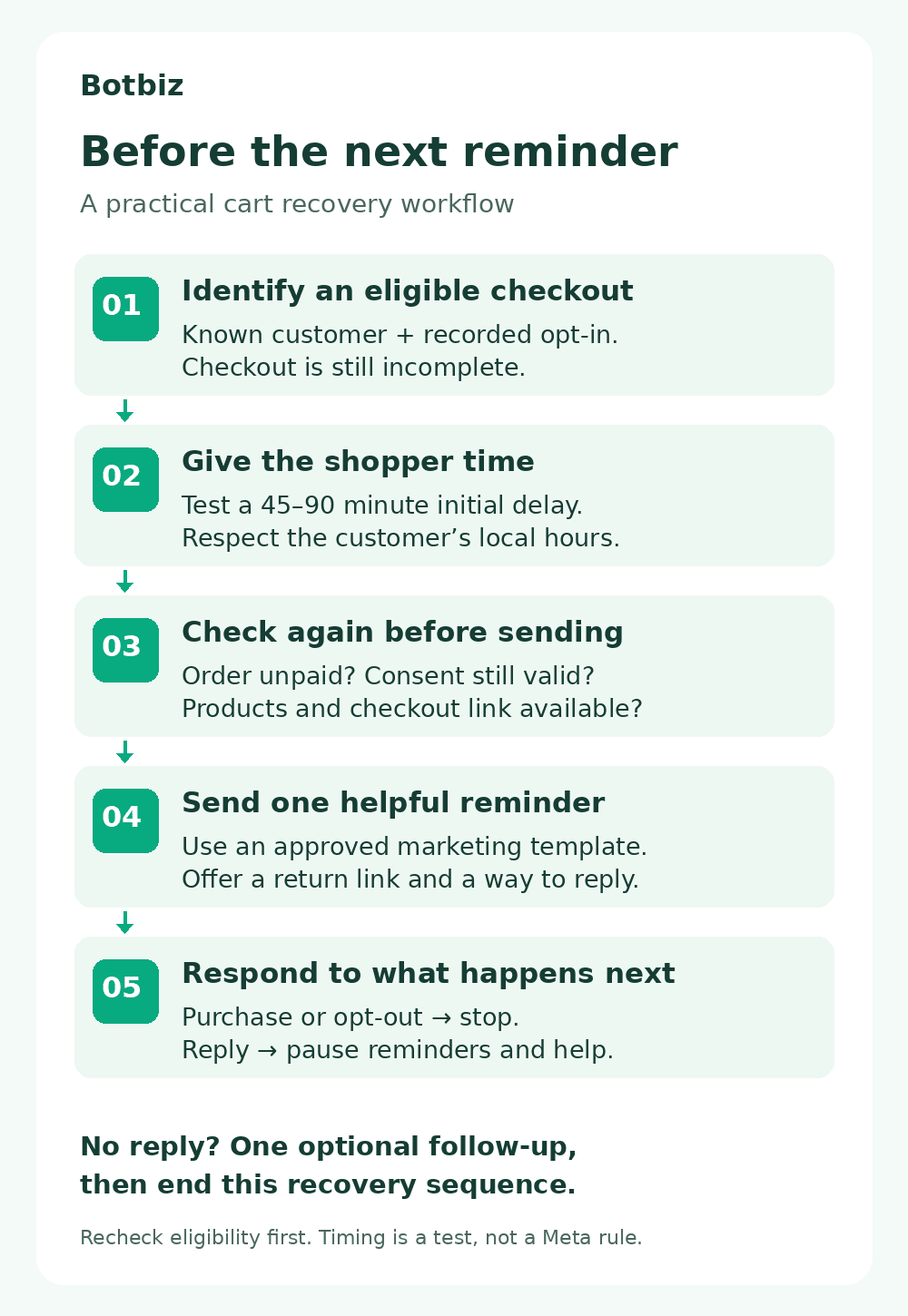
Start with one reminder. Add a second only if it provides value and your results justify it. The timings below are an editorial starting point for testing, not a Meta requirement or a proven optimum for every store.
| Stage | Starting timing | Purpose |
|---|---|---|
| Helpful reminder | 45–90 minutes after checkout inactivity | Restore the checkout link and offer assistance. |
| Optional follow-up | About 24 hours after abandonment | Offer help with an unresolved question, if the shopper remains eligible. |
| End the sequence | After the planned follow-up | Avoid repeatedly chasing the same unfinished purchase. |
Apply the customer’s local sending hours. Coordinate WhatsApp with email and SMS so a shopper does not receive several reminders from different systems at once. If they are speaking with your team, pause the automated sequence.
Three message examples to adapt
These are illustrative drafts, not pre-approved templates. Replace the sample details, map variables to real checkout data, and submit the relevant templates for approval. The third example is an alternative to the second, not an extra message to send automatically.
1. The helpful first reminder
Hi {{1}}, this is Willow & Loom. You left {{2}} in your checkout. Would you like to take another look, or do you have a question before ordering? Reply here for help. Reply STOP to opt out.
Button: Return to checkout. Map it to that shopper’s valid checkout URL. Use a friendly greeting without a name if your data is incomplete.
2. A follow-up that invites a question
Hi {{1}}, still deciding about your Willow & Loom order? Our team can help with sizing or delivery questions. Reply here, or return to your checkout when you’re ready. Reply STOP to opt out.
Only offer help your team can provide. If replies arrive outside staffed hours, explain when a person will respond.
3. An offer, when the economics make sense
Hi {{1}}, you can use {{2}} for {{3}} off eligible items at Willow & Loom until {{4}}. Full terms are available at checkout. Need help choosing? Reply here. Reply STOP to opt out.
Use this version only for a genuine, applicable offer. Check the expiry, product exclusions, and margin. Never claim stock is reserved or an offer is ending unless that is true.
Set the stop rules before turning the flow on
A queued reminder can become outdated while it waits. Make the final eligibility check as close to sending as your integration allows, and cancel pending messages when the situation changes.
| What happened? | What the workflow should do |
|---|---|
| The customer completed the purchase. | Cancel remaining recovery messages for that checkout. |
| The customer opted out. | Suppress further marketing and cancel queued follow-ups. |
| The customer replied. | Pause reminders and hand the conversation to support. |
| The checkout link expired or an item became unavailable. | Skip the stale reminder. |
| The same checkout event arrived twice. | Keep one recovery sequence rather than creating duplicates. |
A reply and a purchase are different events. Answering “Does this come in blue?” should not mark an order as recovered; only the store’s order data can confirm a purchase.
How to plan the workflow with Botbiz
Botbiz’s features include event-based automation, scheduled follow-up sequences, and a shared team inbox. Its integration documentation also lists Shopify and WooCommerce. Use those capabilities as the starting point for your implementation.
The exact checkout trigger, available fields, and cancellation behavior depend on the store integration and dashboard version. The checklist below describes the behavior to configure and verify; it is not a claim that every connector supplies every condition automatically.
- Map the checkout data. Confirm the connection can provide the phone number, permission record, checkout ID, product summary, return link, and order status.
- Prepare the marketing template. Check the approved language and category. Preview the message with realistic sample values, including a missing first name.
- Configure the first delay and eligibility check. Exclude paid orders, opted-out contacts, duplicate checkouts, and invalid links before sending.
- Define ownership of replies. Route questions into the inbox and decide who handles them. Confirm how a reply pauses scheduled reminders.
- Verify cancellation. If the connector cannot cancel a queued message after a purchase, ask the Botbiz team to confirm the required automation or integration before enabling the sequence.
- Run controlled tests. Use your own test number and checkout. Test the failure cases as well as successful delivery.
Measure completed orders, not just clicks
Track eligible checkouts, messages sent, messages delivered, replies, opt-outs, and linked completed orders. Define an attribution window in advance so the same rules apply throughout the test.
For example, an attributed recovery rate could be the number of eligible checkouts completed within your chosen window after a reminder, divided by eligible checkouts enrolled in the flow. Count each checkout once, even if the customer receives two messages.
Hypothetical example: 20 completed checkouts out of 200 enrolled checkouts would be a 10% attributed recovery rate. That is a calculation example, not a Botbiz benchmark. It also does not prove that all 20 purchases were caused by WhatsApp; some shoppers would have returned anyway.
Where volume allows, compare a randomly selected reminder group with an otherwise similar holdout group that receives no WhatsApp recovery message. Keep other campaigns consistent. Compare completed-order rates and profit after discounts, returns, messaging charges, and platform costs.
For budgeting, check Meta’s current pricing for the recipient’s market and message category, plus your platform charges. Evaluate whether the optional second reminder adds enough value to justify its cost and customer impact.
Your pre-launch checklist
- The reminder restores the correct checkout on a mobile device.
- A purchase during the waiting period cancels the reminder.
- An opt-out cancels pending marketing follow-ups.
- A reply reaches the right team and pauses the sequence.
- Duplicate events produce only one sequence.
- Unavailable products and expired links do not trigger stale reminders.
- Reporting counts completed orders once and keeps clicks separate.
Launch with a small eligible audience, review replies and failure reasons, and change one variable at a time. A useful first improvement may be clearer shipping information rather than another message.
Build your first recovery flow
Start with one helpful reminder, a working checkout link, and verified stop rules. Once those work reliably, test whether a second message helps your customers complete their purchase.
Watch the Botbiz demo, then speak with the team about your store platform, sample checkout data, and recovery requirements. Ask the team to confirm the trigger, reply handoff, and purchase-based cancellation for your setup.
Scale Your Business with WhatsApp Cloud API
Get 0% markup fees on Meta API, visual drag-and-drop chatbot builder, shared live team inbox, and 100+ app integrations with Botbiz.