
Powerful Automation & Workflows
Automate Your WhatsApp Marketing
Connect third-party apps like Typeform, Google Forms, Shopify, and more to Botbiz. Automatically trigger WhatsApp messages based on external events.
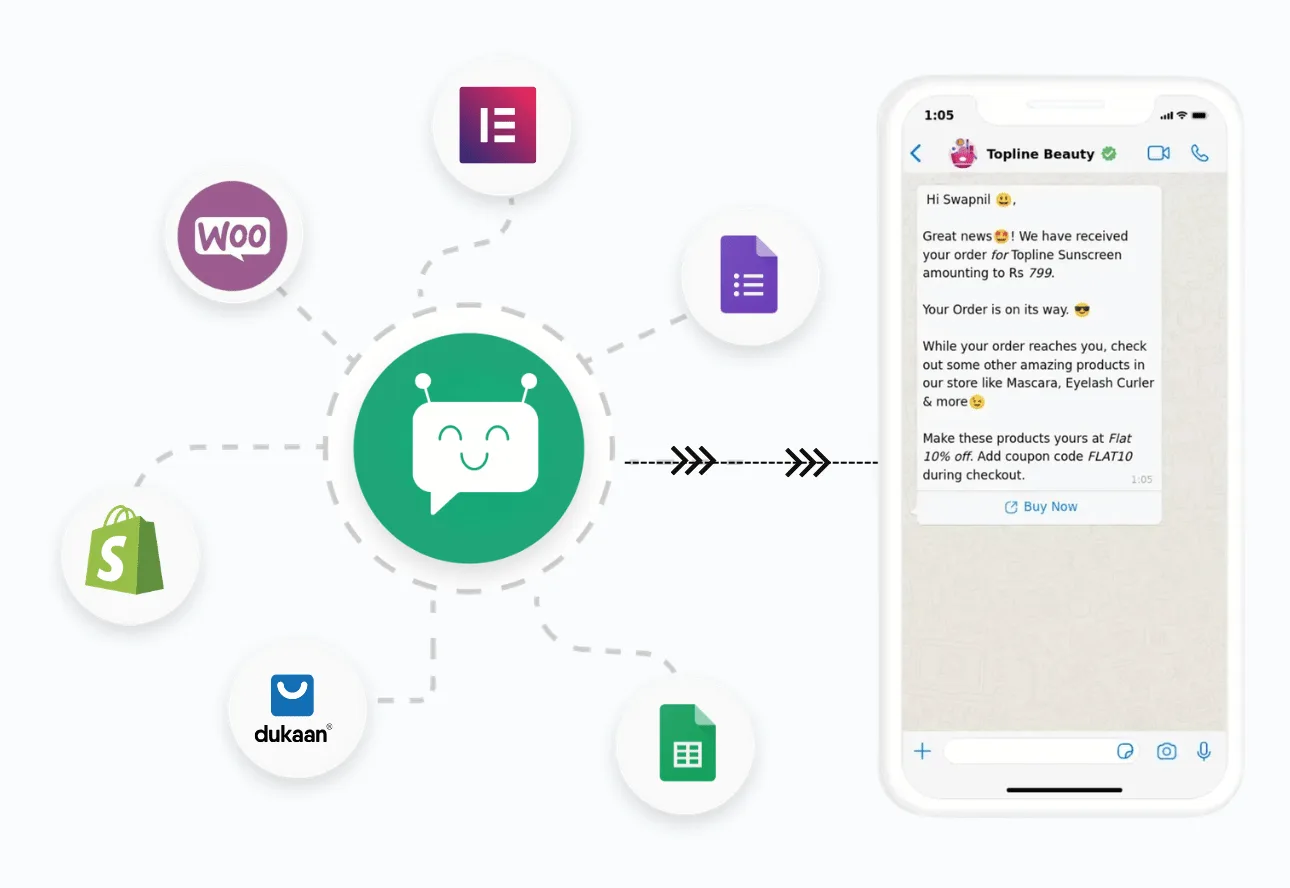
Generate Webhook URL with Your Template
Create unique webhook URLs instantly for any approved WhatsApp message template. Each webhook is ready to receive data from any platform that supports webhooks.
- Select your approved WhatsApp message template
- Generate unique webhook URL with one click
- Secure endpoint ready for external platform integration
- Support for unlimited webhook URLs per account
Connect Any Platform That Supports Webhooks
Paste your generated webhook URL into any platform—Typeform, Google Forms, Shopify, WooCommerce, payment gateways, or custom apps. No complex setup, just copy and paste.
- Works with 1000+ platforms supporting webhooks
- Simple copy-paste integration, no coding required
- Connect Typeform, Google Forms, Shopify, Stripe, and more
- Real-time data transmission from connected platforms
Map Platform Data to Template Variables
Automatically map incoming data fields from your connected platform to your WhatsApp template variables. Simple drag-and-drop interface makes complex mapping effortless.
- Visual data mapping interface—no technical skills needed
- Automatically detect incoming data fields from webhook
- Map form fields, order details, customer info to template
- Test mapping with sample data before going live
Messages Send Automatically on Events
Once configured, WhatsApp messages trigger automatically whenever events occur in your connected platform. Form submitted? Order placed? Payment received? Message sent instantly.
- Instant WhatsApp messages on form submissions
- Order confirmations sent automatically from e-commerce
- Payment notifications triggered by gateway webhooks
- Monitor all triggered messages in real-time dashboard
Connect 1000+ Apps via Zapier
Use Zapier to connect Botbiz with thousands of apps. Create powerful automation workflows that trigger WhatsApp messages from any event.
- Access to 1000+ app integrations
- No-code workflow builder
- Multi-step automation sequences
- Real-time event synchronization
Track Automation Performance
Monitor all your automated workflows with detailed analytics. See success rates, failed attempts, and optimize your automation for better results.
- Real-time delivery tracking
- Success and failure metrics
- Webhook event logs
- Performance optimization insights
Key Benefits
Everything you need to succeed with Powerful Automation & Workflows
1000+ Apps
Connect via Zapier & Pabbly
Webhooks
Custom integration support
Auto Messages
Trigger from any event
REST API
Complete flexibility
Drip Campaigns
Automated sequences
Time Triggers
Schedule-based automation
Conditions
Smart automation rules
Event-driven
React to user actions
Perfect For
See how businesses like yours use Powerful Automation & Workflows
"Botbiz has transformed how we engage with customers on WhatsApp. The powerful automation & workflows feature alone has saved us countless hours."
Ready to Get Started?
Join thousands of businesses already using Powerful Automation & Workflows to grow with WhatsApp.
No credit card required • Setup in 5 minutes
Any event in. One WhatsApp message out.
Connect any app that can send a webhook and Botbiz turns the event into an approved WhatsApp template.
Shopify, WooCommerce, Google Sheets, Elementor, Zapier, Make, n8n, your CRM or your own code: if it can POST JSON, it can trigger WhatsApp. Map the fields once, add conditions and a delay if you need them, and let customers confirm or cancel straight from the message.
Hi Priya, your order #4821 is confirmed. 2 items, total 2,450. Expected delivery Thu 6 Nov.
We will message you when it ships.
Thanks!
How it works
Inbound automation: an external app or your own API fires the event, Botbiz sends the WhatsApp template.
- 1
Approve a template
Create a WhatsApp template with the variables you need: name, products, total, tracking link. Meta approves it once.
- 2
Copy the callback URL
Create a workflow in Botbiz and paste its unique URL into any app that has a webhook field.
- 3
Map the JSON
Capture a live event or paste sample JSON, then pick the field for each variable. Attach Data Formatters where the value needs cleaning.
- 4
Save and activate
Optionally set a delay, conditions, labels and Confirm/Cancel callbacks. Toggle the workflow on.
Map the JSON without writing code
The phone number is mapped first, it is the recipient. Every other dropdown maps to a template variable. Nested paths such as billing.phone and line items are picked straight from the captured payload.
- Capture a live webhook, paste sample JSON or let the AI assistant suggest the mapping
- Auto-map recognises Shopify and WooCommerce orders
- Nested objects and arrays, not just flat fields
- Test with the captured event before you go live
billing.phoneRecipientcustomer.first_name{{1}} nameline_items[].title{{2}} productstotal_price{{3}} totalorder_status_url{{4}} tracking linkClean the data before it goes out
Webhooks are messy: arrays of products, phone numbers with a plus sign, dates in UTC, totals with four decimals. Create a formatter once, reuse it across fields and chain several on one mapping row.
- Join arrays into a readable list
- Strip or add country codes on phone numbers
- Shift dates and format currency
- 15 built-in actions, no code or spreadsheet clean-up
["Hoodie","Cap"]Join with ", "Hoodie, CapPrefix "Items: "Items: Hoodie, CapTruncate 60 charsConfirm on WhatsApp, update the store
Add Confirm and Cancel buttons to the template. When the customer taps one, a Callback API adds an order note, tags the order, changes its status or cancels it in Shopify or WooCommerce. An HTTP API step can call any other endpoint.
- Quick-reply buttons mapped to Callback APIs
- Add note, add tag, change status or cancel the order
- Condition the message to COD orders only
- Delay stays at zero for instant verification
Please confirm your cash-on-delivery order #4830: Classic Hoodie, total 1,299. Reply below to confirm or cancel.
Confirm order
Thank you. Order #4830 is confirmed and will ship today.
Send only the events that matter, when they matter
Conditions decide whether a message goes out: COD only, totals above a threshold, a region, a status. Match any rule or all rules. A delay in minutes turns the same workflow into a cart reminder or a prepaid nudge.
- Conditions on any mapped field
- Match any or all rules
- Delay in minutes: 30 for cart recovery, 5 for prepaid offers, 0 for order alerts
- Skipped events are counted in the report
payment_methodequals "cod"total_pricegreater than 500shipping.countryequals "IN"Reports for every workflow
Each workflow shows what was targeted, processed, delivered, opened, failed, skipped by a condition or unreachable. Download the CSV, resend the failed rows and keep the conversation going in the shared inbox with labels, sequences and team assignment carried over.
- Targeted, processed, delivered, opened, failed, skipped, unreached
- CSV download and one-click resend of failed rows
- Replies land in the shared inbox with the workflow label
- Assign to a team or start a sequence automatically
What teams already run
Six workflows you can copy today. The same engine runs CRMs, payment tools, Zapier, Make, n8n or any custom app that posts JSON.
New order on WhatsApp
Trigger: Shopify or WooCommerce order-created webhook. Map products, total and delivery date into the confirmation.
Read the guide StatusShipped, completed, refunded
Trigger: order-updated webhook. Insert the order ID and the new status, one template per status.
Read the guideVerify before you ship
Condition on payment method = COD. Confirm and Cancel buttons write the answer back to the store.
Nudge COD to pay online
Wait five minutes after checkout, then send a coupon in the template to switch the order to prepaid.
Recover abandoned checkouts
Trigger: WooCommerce plugin or Shopify checkout webhook. Delay 30 minutes, then send the cart link.
Read the guide Forms & SheetsElementor and Google Sheets
Paste the URL into Elementor’s after-submit action or run the Sheets script to message every new row.
Read the guideTwo ways in
Start with the built-in store automation or go straight to the full workflow engine.
Store Automation
Connect Shopify or WooCommerce, choose order notifications, COD verification or abandoned cart and use a default template. Live in minutes.
Read the guide AdvancedWebhook Workflow
Any webhook, nested mapping, formatters, conditions, delays, button callbacks and reports. Everything on this page.
Start freeWorks with your stack
Anything with a webhook URL field, or anything that can POST JSON from code.
Key Benefits
What the webhook workflow adds to your WhatsApp setup
Any app
One callback URL per workflow
No code
Visual mapping and formatters
On time
Conditions and delays
Closed loop
Buttons update the store
Frequently asked questions
What is the Botbiz WhatsApp Webhook Workflow?
An inbound automation. Any app sends a webhook to a unique Botbiz URL, Botbiz maps the JSON to an approved WhatsApp template and sends it to the customer. Optional conditions, delays and button callbacks sit on top.
How is this different from the Shopify or WooCommerce store automation?
Store automation is pre-built: connect the store, pick order notifications, COD or abandoned cart and go. The webhook workflow works with any app and gives you full control of mapping, rules and callbacks.
Do I need to be a developer?
No. Paste a URL into your app, pick fields from dropdowns and save. Developers can also POST JSON from their own code.
Do I need an approved WhatsApp template?
Yes. Business-initiated messages on the WhatsApp Business API must use a template approved by Meta. Botbiz helps you submit and track them.
What apps can trigger a WhatsApp message?
Shopify, WooCommerce, Google Sheets, Elementor, WP Forms, Zapier, Pabbly Connect, Make, n8n, HubSpot, payment gateways and any custom app or ERP that can send a webhook.
Can customers confirm or cancel a COD order on WhatsApp?
Yes. Add Confirm and Cancel quick-reply buttons to the template and map each to a Callback API that tags, notes, updates or cancels the order in Shopify or WooCommerce.
What are Data Formatters?
Reusable rules that clean a value before it is inserted into the template: join arrays, trim or prefix text, strip plus signs from phone numbers, shift dates, round totals. You can chain several on one field.
Can I send only some events, or wait before sending?
Yes. Conditions filter by any mapped field with any-or-all matching, and the delay setting waits a number of minutes before sending.
Is the webhook URL private?
Each workflow gets its own unguessable URL. Treat it like a key: share it only with the app that should trigger the workflow and regenerate it if needed.
How do I know it worked?
Open the workflow report: targeted, processed, delivered, opened, failed, skipped and unreached counts, a CSV download and a resend button for failed rows.
Event in. WhatsApp out.
Connect the webhook once. Botbiz maps the data, sends the template and can update the store when the customer replies.
No credit card required • Setup in 5 minutes